
Pro: This needs a Signocore SEO Pro license.
The Redirect Manager sends visitors and search engines from old addresses to new ones, and the 404 manager shows which missing addresses people actually hit, so you can fix the ones that matter.
Find the Redirect Manager
By default, the Redirect Manager has its own menu, Signocore Redirects, with Redirects, 404 Manager and Settings. Each page also has tabs for Redirect Manager, 404 errors and Settings. Only administrators can open them.
Two switches under Signocore SEO → General → Redirects control this:
| Setting | Default | What it does |
|---|---|---|
| Enable | On | Turns the Redirect Manager on. When it is off, the menus disappear, no redirects run and no 404s are logged. |
| Separate Menu | On | When off, the pages move to Tools → Redirect Manager, Tools → 404 Manager and Settings → Signocore Redirects. |
Create a redirect
- Open Signocore Redirects → Redirects. The top row of the table is an empty redirect; Add Row adds another.
- Choose the status code under HTTP.
- Enter the old address under Source, as the path after your domain, for example
/old-page. - Under Target, choose Custom URL and enter a full URL, or choose a content type and pick the post or page.
- Leave Active on.
- Click the save icon at the end of the row.
To change a redirect later, edit the row and click the update icon. The trash icon deletes it.
| HTTP | Use it when |
|---|---|
| 301 Permanent | The page has moved for good. This is the right choice in most cases. |
| 302 Temporary | The page is away for a while and will come back. |
| 307 Temporary (keep method) | Like 302, but the browser repeats the same request method, which matters for forms. |
| 410 Gone (no target) | The page is removed for good. Visitors see your theme's 404 page with a 410 status, which tells search engines the page is gone on purpose. |
A redirect matches one exact address. Letter case and a trailing slash do not matter, and wildcards or regular expressions are not supported.
The plugin stops you from saving a source that already has a redirect, a target that is the same as the source, or a redirect that would send visitors in a loop. When a redirect points to a post or page that is later deleted or unpublished, the redirect switches itself off the next time someone uses it. The Hits column counts how often each redirect was used.
Safe Mode
Safe Mode is on by default. A redirect then only runs when its source address would otherwise show a "page not found" error, so a redirect can never hide a live page by accident.
To redirect a page that still exists, unpublish the page or turn off Safe Mode under Settings. With Safe Mode off, the SEO box of a page that has a redirect shows "We found a redirect for this URL."
Changed slugs
When you change the slug of a post and a visitor opens the old address, Signocore SEO finds the post through WordPress's record of old slugs, creates a 301 redirect to it and adds the redirect to your list. WordPress keeps old slugs for posts, products and similar content, but not for pages, so add redirects for renamed pages yourself.
The 404 manager
Signocore Redirects → 404 Manager lists the addresses visitors requested that do not exist, with the most hit first. Hover the question mark next to an address to see up to 10 recent referring pages.
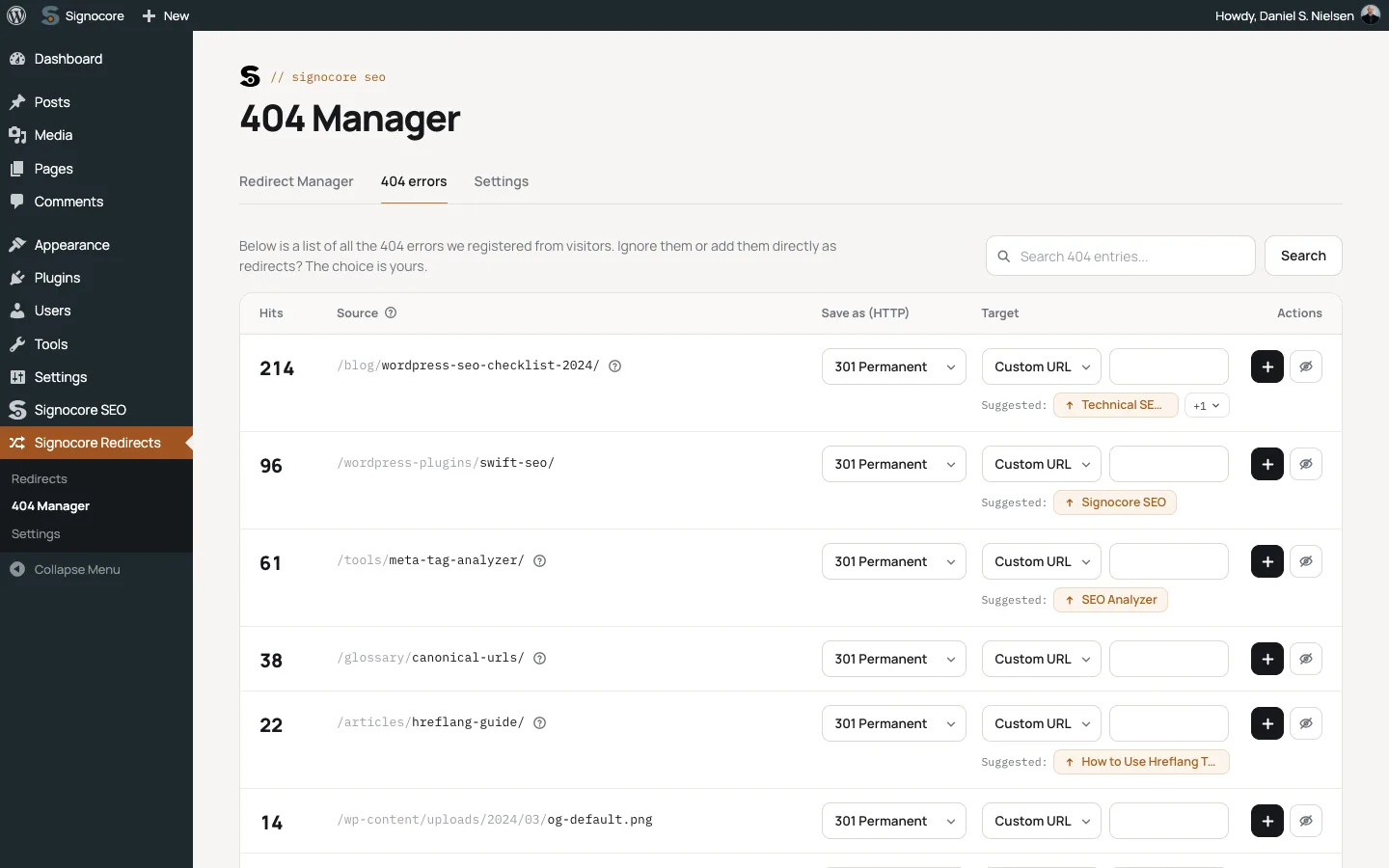
By default, only visits that came from a link are logged. Turn on Log all 404s to log direct visits too.
Turn a 404 into a redirect
- Choose a status code under Save as (HTTP).
- Choose a target under Target, or click a page next to Suggested:. Suggestions are up to three published pages with a similar slug.
- Click the save icon. The address leaves the 404 list and becomes a redirect.
Click the Ignore icon to hide an address you do not want to redirect.
Keep the log tidy
- Keep 404 entries for: entries that have not been hit for this many days are removed once a day. The default is 90. Use
0to keep them until the log is full. - The log holds at most 5,000 entries. When it is full, the entries that were hit longest ago make room for new ones.
- Clear 404 entries deletes every entry in the 404 list at once. Ignored addresses are kept, so they stay hidden. This cannot be undone.
Redirect settings
Open the Settings tab.
| Setting | Default | What it does |
|---|---|---|
| Attachments | On | Redirects attachment pages to the post they belong to, or to the home page when they belong to none. |
| URL case | On | Redirects addresses with capital letters to the lowercase address. Addresses with a dot, such as file names, keep their case. |
| Safe Mode | On | Only runs redirects for addresses that would otherwise show "page not found". |
| Domain redirection | Off | Redirects requests on any other domain that points to your site to the same path on your site address. |
| Ignore file extensions | A list of common file types | Skips 404s for these extensions, separated by commas. |
| Ignore common strings | A list of common probe paths | Skips 404s whose address contains one of these strings. |
| Log all 404s | Off | Also logs 404s without a referring page. |
| Keep 404 entries for | 90 days | See above. |
The default ignore lists filter out the requests bots send to look for weak spots, such as .env, .sql, wp-config.php and phpmyadmin. They also skip .js, .css, .xml and .txt files and everything under wp-content, so a missing image in your uploads folder is not logged unless you edit the lists.
Import and export
The Import/Export card on the Settings tab moves redirects in and out as a CSV file separated by semicolons, in the format HTTP;Source;Target:
HTTP;Source;Target
301;/old-page;https://example.com/new-page/
302;/summer-sale;https://example.com/sale/
410;/discontinued-product;
- Import Redirects checks the whole file first. If a single row is invalid, nothing is imported. The header row is optional, a 410 row needs no target, and a source that already exists is updated.
- Export Redirects downloads your redirects. Redirects to a post or page are exported with its current URL. With no redirects yet, you get a sample row that shows the format.
- Export 404 Entries downloads the 404 log.