WordPress's entire plugin architecture rests on a single idea: code should be able to reach into a running system and modify its behavior without touching the system's own files. That idea is implemented through hooks - and understanding them at a mechanical level separates developers who use WordPress from developers who extend it.
What Hooks Actually Are
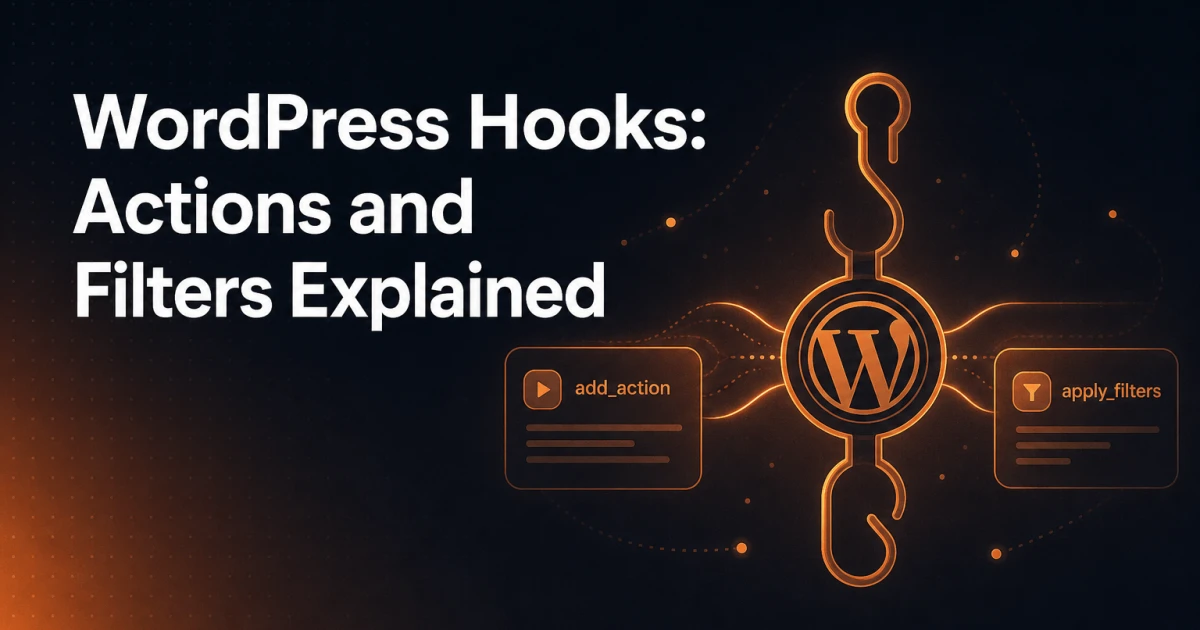
A hook is a named point in WordPress's execution flow where external code can attach itself. WordPress core - and any well-written plugin or theme - deliberately places these attachment points throughout its codebase. When execution reaches one of those points, WordPress looks up every function registered against that hook name and runs them in order.
This is the Observer pattern in practice. WordPress doesn't need to know anything about your plugin at the time it's written. Your plugin announces, at runtime, "when WordPress reaches point X, call my function." The system honors that registration without any modification to core. This is why you can install, activate, and deactivate plugins without ever editing wp-includes - and why doing so would be a serious mistake even if you could.
There are exactly two types of hooks: actions and filters. They share the same underlying mechanism but serve different purposes, and conflating them causes bugs that are genuinely difficult to trace.
Actions vs. Filters: The Core Distinction
An action fires at a specific moment in WordPress's execution and says "something just happened - do whatever you need to do." Your callback receives context data, performs side effects (writing to a database, enqueuing a script, sending an email), and returns nothing meaningful. WordPress does not use your return value.
A filter passes a value through a chain of functions and says "here is some data - you may modify it before I use it." Your callback receives the value, optionally transforms it, and must return it. If you forget to return the value in a filter callback, you've just set that data to null for everything downstream. This is one of the most common hook-related bugs.
A useful analogy: an action is a notification - a bell rings, you react, the bell doesn't care what you did. A filter is a pipeline - water enters, you may add minerals or remove impurities, but you must pass the water along.
Registering Hooks: add_action() and add_filter()
Both functions share an identical signature:
add_action( string $hook_name, callable $callback, int $priority = 10, int $accepted_args = 1 );
add_filter( string $hook_name, callable $callback, int $priority = 10, int $accepted_args = 1 );
A basic action registration looks like this:
add_action( 'init', function() {
    // Runs on every request after WordPress has loaded
    register_post_type( 'book', [
        'label'  => 'Books',
        'public' => true,
    ] );
} );
And a basic filter registration:
add_filter( 'the_content', function( $content ) {
if ( is_single() ) {
$content .= 'Estimated read time: 3 minutes
';
}
return $content; // Never forget this
} );Priority and Accepted Arguments
The $priority parameter controls the execution order when multiple callbacks are registered on the same hook. Lower numbers run first. The default is 10. Callbacks with the same priority run in the order they were registered.
// Runs before the default priority-10 callbacks
add_filter( 'the_title', 'my_early_title_filter', 5 );

// Runs after everything else
add_filter( 'the_title', 'my_late_title_cleanup', 99 );
Priority decisions matter in real scenarios. If you're modifying content that another plugin also modifies, the order determines whose changes survive. A plugin that strips shortcodes at priority 10 will undo your shortcode additions if you registered at priority 10 as well - register at 9 instead.
The $accepted_args parameter tells WordPress how many arguments to pass to your callback. Many hooks pass more than one argument, but WordPress only passes as many as you declare you'll accept. Always check the hook's documentation for the full argument list.
// save_post passes $post_id, $post, and $update
add_action( 'save_post', function( $post_id, $post, $update ) {
    if ( $update && $post->post_type === 'book' ) {
        // Only runs on updates to book posts
        update_post_meta( $post_id, '_last_edited_by', get_current_user_id() );
    }
}, 10, 3 ); // Note: accepted_args = 3
Removing Hooks
remove_action() and remove_filter() detach a previously registered callback. They require the exact same hook name, callback reference, and priority that were used during registration. This is why anonymous functions are a liability when you need to remove them later - you can't reference an anonymous function after the fact.
// Works fine - named function can be referenced
add_filter( 'the_content', 'my_content_modifier', 10 );
remove_filter( 'the_content', 'my_content_modifier', 10 );

// Cannot be removed - anonymous function is unreferenceable
add_filter( 'the_content', function( $content ) {
    return $content . ' extra';
}, 10 );
Removing hooks from other plugins or themes requires timing. The target hook must already be registered before you remove it. Wrapping your removal in a hook that fires after the target plugin loads is the standard approach:
add_action( 'after_setup_theme', function() {
    remove_filter( 'the_content', [ Some_Plugin::get_instance(), 'modify_content' ], 10 );
} );
Essential WordPress Hooks Every Developer Should Know
init
init fires after WordPress has finished loading but before any headers are sent. It's the correct place to register custom post types, taxonomies, and rewrite rules. Many developers use it as a general-purpose bootstrap hook.
add_action( 'init', 'myprefix_register_taxonomies' );wp_enqueue_scripts
Scripts and styles should never be loaded with wp_head directly. wp_enqueue_scripts is the correct hook - it allows WordPress to manage dependencies, deduplicate assets, and control load order. Use admin_enqueue_scripts for the backend.
add_action( 'wp_enqueue_scripts', function() {
    wp_enqueue_style(
        'my-plugin-styles',
        plugin_dir_url( __FILE__ ) . 'assets/css/main.css',
        [],
        '1.2.0'
    );
    wp_enqueue_script(
        'my-plugin-script',
        plugin_dir_url( __FILE__ ) . 'assets/js/main.js',
        [ 'jquery' ],
        '1.2.0',
        true // Load in footer
    );
} );
the_content
This filter passes post content through a chain before it renders. Core uses it for wpautop, shortcode processing, and embed handling. Plugins use it to append related posts, add schema markup, or inject CTAs. Be mindful of where in that chain you're inserting - check what other active plugins are doing at the same priority.
save_post
Fires after a post is saved to the database. Essential for custom field validation, cache invalidation, or triggering external API calls when content changes. Always verify nonces and check post types - save_post fires for every post type, including auto-saves and revisions.
add_action( 'save_post_book', function( $post_id, $post, $update ) {
    // Using the post-type-specific variant: save_post_{post_type}
    if ( defined( 'DOING_AUTOSAVE' ) && DOING_AUTOSAVE ) return;
    if ( ! current_user_can( 'edit_post', $post_id ) ) return;

    $isbn = sanitize_text_field( $_POST['book_isbn'] ?? '' );
    update_post_meta( $post_id, '_book_isbn', $isbn );
}, 10, 3 );
admin_menu
Use this hook to register custom admin pages, submenus, or modify the existing admin navigation. It fires after the default admin menu structure is built.
add_action( 'admin_menu', function() {
    add_menu_page(
        'Book Manager',
        'Books',
        'manage_options',
        'book-manager',
        'myprefix_render_book_manager',
        'dashicons-book',
        25
    );
} );
Creating Your Own Custom Hooks
Well-written plugins expose their own hooks so other developers can extend them without forking. This is what separates a plugin from a library. Use do_action() to fire a custom action and apply_filters() to create a filterable value.
// In your plugin's processing function
function myprefix_process_book( $book_data ) {

    // Allow other code to modify input before processing
    $book_data = apply_filters( 'myprefix_before_process_book', $book_data );

    // Core processing logic
    $result = myprefix_run_processing( $book_data );

    // Notify other code that processing completed
    do_action( 'myprefix_after_process_book', $result, $book_data );

    // Allow filtering the final output
    return apply_filters( 'myprefix_process_book_result', $result, $book_data );
}
Name your hooks with a unique prefix to avoid collisions. Document what arguments they pass and at what point in execution they fire. Treat your hook API as a public contract - removing or renaming a hook in a later version is a breaking change for anyone who depends on it. This is the same philosophy behind the Signocore plugin suite - each plugin is built to coexist cleanly with other tools rather than fight for control of shared hooks.
A Practical Example: Adding a Feature Without Touching Core
The following example adds a word count notice below single post content and logs a view count to post meta - entirely through hooks, with zero core modifications:
// 1. Append word count to single post content
add_filter( 'the_content', 'myprefix_append_word_count', 20 );
function myprefix_append_word_count( $content ) {
if ( ! is_single() || ! in_the_loop() || ! is_main_query() ) {
return $content;
}
$word_count = str_word_count( wp_strip_all_tags( $content ) );
$notice = sprintf(
'%d words
',
$word_count
);
return $content . $notice;
}
// 2. Increment view count on each page load
add_action( 'wp', 'myprefix_track_post_view' );
function myprefix_track_post_view() {
if ( ! is_single() || is_user_logged_in() ) return;
$post_id = get_queried_object_id();
$views = (int) get_post_meta( $post_id, '_view_count', true );
update_post_meta( $post_id, '_view_count', $views + 1 );
}
// 3. Display view count in admin columns
add_filter( 'manage_post_posts_columns', function( $columns ) {
$columns['view_count'] = 'Views';
return $columns;
} );
add_action( 'manage_post_posts_custom_column', function( $column, $post_id ) {
if ( $column === 'view_count' ) {
echo (int) get_post_meta( $post_id, '_view_count', true );
}
}, 10, 2 );Three distinct features, no core edits, fully removable by deactivating the plugin. This is hooks-based development working as intended. For more context on how PHP and WordPress's architecture enable this kind of clean extension, the article debunking common misconceptions about PHP and WordPress plugins covers related ground worth reading.
Debugging Hook-Related Issues
Hook bugs tend to fall into a small number of categories, each with a reliable diagnostic approach.
Callback never fires: Confirm the hook name is spelled correctly - WordPress won't throw an error for a misspelled hook, it simply never calls your function. Use
has_action()orhas_filter()to verify registration. Also check whether youradd_action()call itself runs - wrap it in a condition that might be false.Filter returns null or empty: The callback registered on the filter is not returning the value. Every filter callback must return something. This is the single most common filter bug.
Wrong execution order: Two callbacks conflict because priority was assumed rather than checked. Use
global $wp_filter;and inspect$wp_filter['hook_name']to see every registered callback and its priority at runtime.Hook fires too early or too late: Your
add_action()call is placed inside a function that runs after the target hook has already fired. Move registration to an earlier hook or to the top level of your plugin file.Removing a hook that won't remove: The priority used in
remove_action()doesn't match the registration priority, or the callback is a closure or object method that requires an exact reference match.
The Signocore developer tools include utilities like the Diff Checker that can help when comparing plugin versions to identify where hooks were added or changed between releases - useful when a third-party plugin update breaks your hook integration.
For deeper runtime inspection, the Query Monitor plugin is the standard tool in the WordPress developer's debugging kit. It surfaces all hooks fired during a request, along with the callbacks registered on each, their priorities, and execution times.
Hook Discipline as Architecture
The hook system is not just a convenience feature - it's the architectural contract that makes the entire WordPress ecosystem function. Every plugin that plays by these rules can coexist with every other plugin that does the same. Every plugin that bypasses them - overriding core functions, directly modifying database records without hooks, hardcoding behavior that should be filterable - creates fragility that compounds across updates.
Writing hook-first code means writing code that other developers can extend, that core updates won't break, and that can be cleanly removed without residue. That discipline is what distinguishes a plugin built for production from one built for a demo. The same principle applies to how well-crafted WordPress plugins like Signocore Toolkit are designed - exposing clean integration points rather than creating closed systems that resist customization.