
Besides the FAQ page, you can show questions in any post or page. Signocore FAQ has two blocks, a shortcode and a widget, and it can add an FAQ tab to WooCommerce products.
| Tool | Use it for |
|---|---|
| FAQ Element block | Writing one question and its answer straight into a post or page. |
| FAQ List block | Showing questions from your FAQ, by category or hand-picked, as an accordion or a list of links. |
[signocore_faq] shortcode |
The same as the FAQ List block, where blocks are not available. |
| Recent FAQs widget | A list of your newest questions in a widget area. |
Both blocks are in the Signocore category of the block inserter.
The FAQ Element block
The FAQ Element block holds a single question with its answer, written in the post itself. It is not connected to the questions under FAQ → All Questions.
- Add the FAQ Element block where you want the question.
- Type the question in the question field.
- Write the answer below it. The answer can hold any blocks, such as paragraphs, lists and images.
On your site, the question shows as a heading with the answer below it, always open. Add one block per question.
With Signocore SEO Pro, the FAQ Element blocks in a post or page add FAQPage structured data with their questions to that page. Only blocks placed directly in the content count, not blocks inside a group, columns or another block. The FAQ List block, the shortcode and the widget add no structured data.
The FAQ List block
The FAQ List block shows questions from your FAQ, so an answer you update under FAQ → All Questions changes everywhere it is shown. The editor shows a live preview.
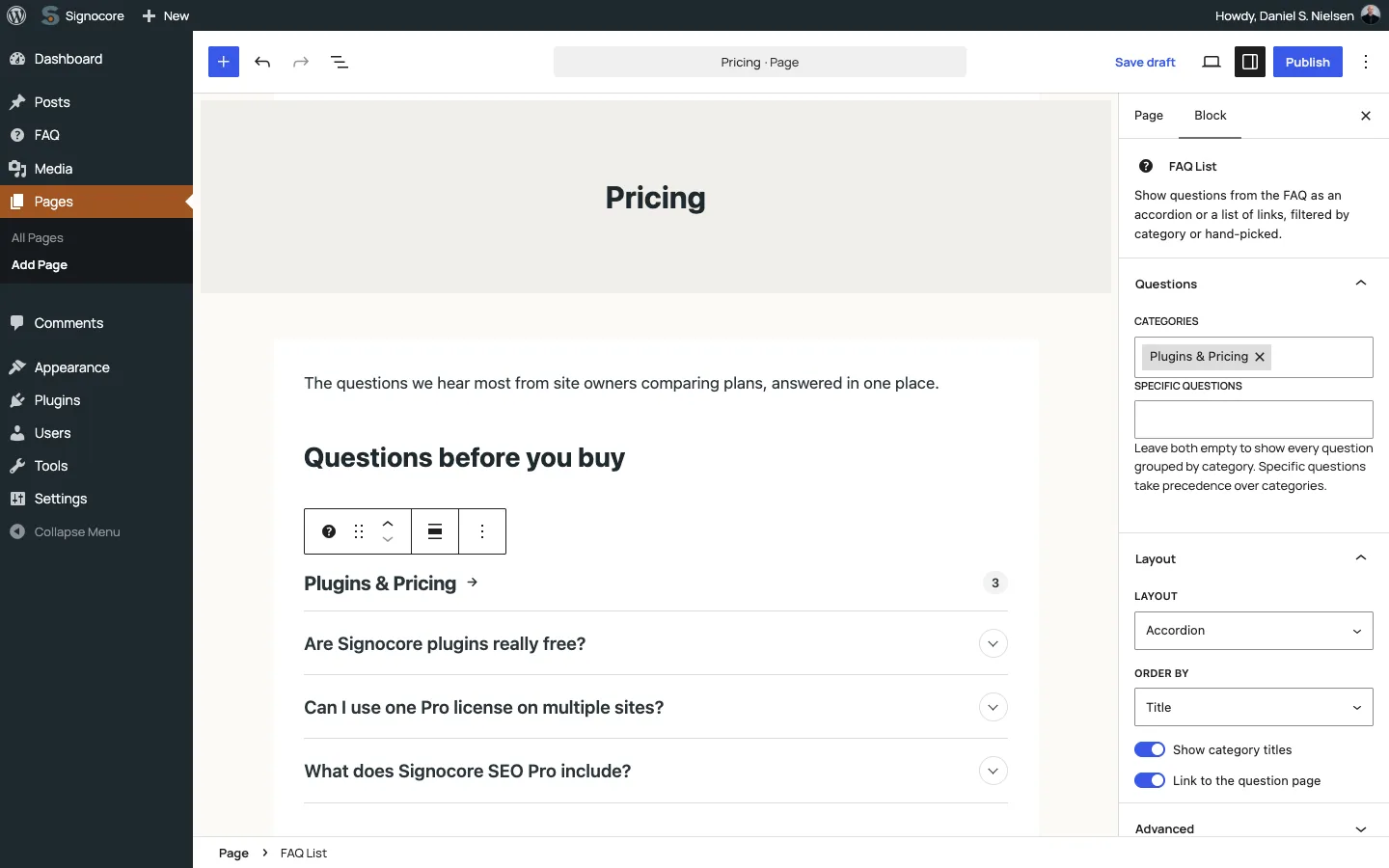
The block settings have two panels:
| Setting | Panel | Default | What it does |
|---|---|---|---|
| Categories | Questions | Empty | The categories to show, as one group each, in the order you add them. |
| Specific questions | Questions | Empty | Questions to show in the order you add them. They take precedence over Categories. |
| Layout | Layout | Accordion | Accordion shows the answers, opened by clicking a question. List of links shows the questions as links to their pages. |
| Order by | Layout | Title | Title sorts the questions in each group from A to Z, Newest first by date. Hidden when you pick specific questions. |
| Show category titles | Layout | On | Shows each category as a heading with the number of questions. With category navigation on, the heading links to the category page. Hidden when you pick specific questions. |
| Link to the question page | Layout | On | Adds a "Go to question" link below each answer. Only in the accordion. |
Leave both Categories and Specific questions empty to show every question: questions without a category first, then every category that has questions, in alphabetical order. The block also supports wide and full width alignment.
The accordion leaves out questions without an answer, and both layouts leave out questions protected by a password. A list of links fills as many columns as fit the space.
The shortcode
[signocore_faq]
[signocore_faq categories="12,15" layout="list" orderby="date"]
[signocore_faq questions="48,51,50" links="0"]
The shortcode shows the same lists as the FAQ List block. Use it in the classic editor, in a widget or in a theme template with do_shortcode().
| Attribute | Default | What it does |
|---|---|---|
categories |
Empty | Category IDs separated by commas. Each category becomes a group, in the order you list them. |
questions |
Empty | Question IDs separated by commas, shown in that order without category headings. They take precedence over categories. |
layout |
accordion |
accordion or list. Any other value gives the accordion. |
category_titles |
1 |
1 shows the category headings, 0 hides them. true, yes and on also count as on. |
links |
1 |
1 adds a "Go to question" link below each answer in the accordion, 0 leaves it out. |
orderby |
title |
title sorts from A to Z, date puts the newest questions first. Not used with questions. |
Without categories and questions, the shortcode shows every question, grouped as in the block. To find an ID, hover over a category under FAQ → Categories or a question under FAQ → All Questions and look at the address of the edit link: the number after tag_ID= is the category ID, and the number after post= is the question ID.
The Recent FAQs widget
Add the Recent FAQs widget under Appearance → Widgets in themes that have widget areas. It lists your newest questions as links to their pages.
| Field | Default | What it does |
|---|---|---|
| Title: | Empty | Heading above the list. |
| Number of questions to show: | 5 | How many questions to list. |
Link to a single answer
In an accordion, every question has an anchor made from its slug: #faq- followed by the question's slug. A link such as example.com/pricing/#faq-can-i-change-my-plan opens that answer and scrolls to it. This works for the FAQ List block, the shortcode and the FAQ page in the Accordion layout.
When a visitor opens a question, the address in the browser changes to its anchor, so the visitor can copy the link and share that exact answer. If the same question is shown twice on one page, the second copy gets -2 added to its anchor.
WooCommerce product FAQs
With WooCommerce active, products get an FAQ tab that shows questions as an accordion, with a "Go to question" link below each answer. There are two ways to fill it:
- Hand-picked questions. On the product edit screen, use the FAQ box in the sidebar to search for and select questions, then update the product. They are shown in alphabetical order.
- Tag matching. When you pick no questions, the tab shows up to 10 questions whose tags match the product tags, sorted from A to Z. A product tag matches a question tag with the same slug, so a product tagged "shipping" shows the questions tagged "shipping".
The tab appears only when there is at least one published question to show. Turn it off for the whole shop with Product FAQ in the Related Content card under FAQ → Settings.
For developers
| Item | Name |
|---|---|
| Post type | wpsseo_faq, REST base wpsseo_faq at /wp-json/wp/v2/wpsseo_faq |
| Category taxonomy | faq_cat, REST base faq_cat at /wp-json/wp/v2/faq_cat |
| Tags | post_tag, shared with posts |
| Hand-picked product questions | The _signocore_faq_ids post meta on the product, an array of question IDs |
Signocore FAQ has no hooks of its own. To change the shortcode's defaults, use the WordPress core filter shortcode_atts_signocore_faq, which runs for every [signocore_faq] shortcode:
add_filter('shortcode_atts_signocore_faq', function (array $out, array $pairs, array $atts): array {
    // Show a list of links unless the shortcode sets a layout itself.
    if (!isset($atts['layout'])) {
        $out['layout'] = 'list';
    }

    return $out;
}, 10, 3);
The stylesheet uses currentColor for lines and tints, so it follows the theme's text color. Set --signocore-faq-accent to color links and hover states; without it they use the text color:
:root {
    --signocore-faq-accent: #0a6c74;
}
| Selector | Element |
|---|---|
body.faq-page |
The page chosen as the FAQ page. |
.faq-list-wrap |
The wrapper of the FAQ page, the FAQ List block, the shortcode and the product tab. It gets .faq-accordion in the accordion layout, and on the FAQ page's list of links .columns-1 to .columns-6. |
.faq-list |
One group, with the category heading in an h4 and the count in .faq-count. |
details.faq-item |
One accordion item, with the question in summary.faq-question, the answer in .faq-answer and the "Go to question" link in .faq-link. |
.wp-block-signocore-faq-element |
The FAQ Element block, with the question in h4.question and the answer in .answer. |
.related-questions |
Related questions on question pages, below posts, on tag archives and on glossary term pages. |
ul.faq-recent |
The Recent FAQs widget list. |