Most WordPress sites publish dozens of articles, optimize their titles, chase backlinks - and completely ignore the one content type that would quietly compound all of that work. A glossary is not a nice-to-have resource page. It is a permanent internal linking infrastructure that makes every other page on your site more authoritative, more connected, and harder to displace in search.
If you have not built one yet, you have been leaving link equity on the table with every article you publish.
Why Glossaries Build Topical Authority Faster Than Almost Anything Else
Search engines reward sites that demonstrate depth of knowledge on a subject - not just breadth. Publishing twenty articles on SEO topics signals interest. Publishing twenty articles and a structured glossary that defines, contextualizes, and cross-references every key concept signals expertise.
A glossary forces you to articulate what your site is actually about. Each term you define is a micro-signal of topical relevance. When Google crawls a page about caching on your site and finds it linked from five related articles, cited in a structured glossary, and cross-referenced to adjacent terms, it builds a semantic map of your domain. That map is topical authority in practice - not in theory.
The compounding effect matters too. A blog post decays. It gets less fresh over time, its rankings drift, and you are always chasing the next piece. A glossary term for SEO, Core Web Vitals, or click-through rate does not decay - it accumulates links and relevance as your site grows. Every new article you write becomes an opportunity to reinforce it.
The Glossary as a Permanent Internal Linking Hub
Think about internal linking architecture for a moment. Most sites link haphazardly - editors drop in a related link when they remember to, or when a plugin highlights a keyword. The result is a link graph that looks like a scatter plot: some pages are heavily linked, most are islands.
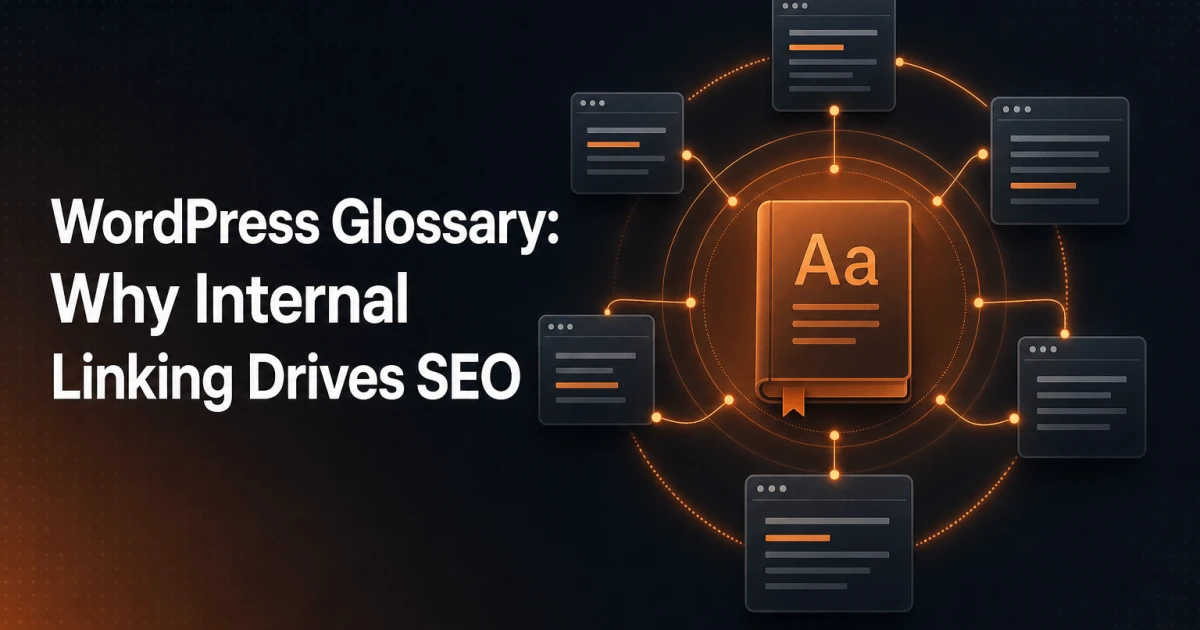
A glossary inverts this. It creates a hub-and-spoke structure where every spoke - your articles, guides, and landing pages - has a natural reason to link to the hub, and the hub links back out to the spokes. The relationship is bidirectional and logical, not forced.
Consider the flow:
Articles link to glossary terms - when you mention a technical concept in a post, you link to the glossary definition. This is natural, adds value for readers who need context, and passes link equity to the glossary page.
Glossary terms link back to articles - each definition can include "further reading" links to your most relevant posts, tutorials, or case studies. This distributes authority back out to your content.
Glossary terms link to each other - related terms cross-reference each other, creating a dense semantic cluster that search engines can traverse and understand.
The result is a site where no important page is an orphan. Every term you define has incoming links, and every article you publish has an anchor in the glossary network.
The SEO Mechanics: Link Equity, Semantic Relevance, and Orphan Pages
Link equity - sometimes called PageRank - flows through internal links just as it does through external ones. When a high-traffic article links to a glossary term, that term inherits some of the article's authority. When the glossary term links back to three related articles, it distributes that equity further. Done across 100+ terms and dozens of articles, this creates a site-wide authority network that no single piece of content could achieve alone.
Semantic relevance works differently but just as powerfully. When Google sees a page about client-side rendering linked from articles about JavaScript performance, Core Web Vitals, and developer tooling, it understands the conceptual neighborhood that page lives in. It does not need to guess. The internal link context tells the story.
Orphan pages are a persistent technical SEO problem - pages that exist but receive no internal links and are therefore invisible to crawlers beyond the sitemap. A glossary eliminates orphans systematically. If a new article covers a topic, you define the key terms, add them to the glossary, and link from the article. The new page is immediately wired into the site's link graph. Check your own orphan situation with the Signocore SEO Analyzer - the links audit will surface pages that are technically indexed but structurally isolated.
What Makes a Glossary Worth Reading
A glossary fails when it becomes a dry dictionary. Three hundred stub definitions with one sentence each, no context, no links, no examples - that is not a resource, it is a database no one visits. Search engines are also getting better at detecting thin content clusters, so padding your glossary with minimal entries will not move the needle.
What makes a glossary genuinely useful - and therefore genuinely powerful for SEO - is depth and perspective. Each entry should:
Define the term clearly, but go beyond the obvious dictionary meaning. Add the practitioner context - how does this concept actually behave in a real WordPress setup or SEO campaign?
Explain why it matters to your specific audience. A definition of DNS for a general audience looks different from one written for developers managing multi-site WordPress environments.
Connect to adjacent concepts with inline links to related terms. This keeps readers inside your glossary, increases time on site, and builds the semantic link cluster that benefits rankings.
Point to deeper resources - your own articles, guides, or tools where the reader can learn more. The glossary is not the destination; it is the connective tissue.
A glossary written with genuine editorial intent reads like a reference a practitioner would bookmark. A glossary written purely for SEO reads like one no practitioner would ever visit twice. The difference is obvious to both readers and algorithms.
How to Build and Maintain a Glossary in WordPress
The structural requirements for a well-functioning glossary are specific: alphabetical navigation, individual permalink pages per term (not a single long page), clean URL structure, and a way to cross-reference terms without manual link management. Trying to build this with standard WordPress pages or custom post types from scratch is possible but tedious to maintain at scale.
The Signocore Glossary plugin handles this architecture natively. Each term gets its own indexed page with a clean slug, alphabetical filtering, and built-in cross-referencing between terms. The plugin does not bloat the database with redundant metadata, and it integrates with the broader Signocore plugin ecosystem - so if you are also running structured data via the Signocore SEO plugin, your glossary terms can carry appropriate schema markup automatically.
For the actual build process, the approach that works at scale is:
Start with your existing content - audit your top 20 articles and extract every technical term you use without defining. Those are your first glossary entries.
Write entries at depth - aim for 150-300 words per term minimum, with at least two internal links per entry (one to a related term, one to a relevant article).
Go back and add links - once the glossary is live, systematically update existing articles to link to the relevant terms. This is the step most people skip, and it is where most of the SEO value is.
Add new terms alongside new content - when you publish an article that introduces concepts not yet in the glossary, define them. Make it part of the publishing workflow, not an afterthought.
How Signocore's Own 121-Term Glossary Was Built
Signocore's glossary at signocore.com was not built in a single sprint. It grew alongside the content strategy, starting with the terms most central to the site's core topics - SEO, web performance, developer tooling, and WordPress - and expanding outward as new articles were published.
The 121-term glossary now functions as the connective tissue for the entire site. Articles on topics like structured data and modern SEO, Core Web Vitals, and Edge SEO all link into the glossary at natural points, and the glossary terms link back to those articles as further reading. No page in that cluster is isolated - they all reinforce each other.
The practical effect is measurable. Glossary pages accumulate inbound internal links passively as new content is published. They rank for long-tail definitional queries that would be too thin to support a full article. And they serve a genuine reader purpose - when a developer or marketer lands on a Signocore article and encounters an unfamiliar term, there is a link to follow that keeps them on the site rather than sending them to Wikipedia.
The Passkeys entry, for example, sits in a cluster with security and authentication content. The SCSS entry connects to developer tooling articles. The UI entry bridges UX content and frontend performance pieces. None of these connections happened by accident - they were built into the editorial workflow from the start.
The Asset You Keep Ignoring
Every article you publish without a glossary to link into is a missed compounding opportunity. Every technical term you use without defining is a dead end for a reader who needed more context. Every internal link you fail to create is link equity that dissipates instead of circulating.
A glossary is not glamorous content. It does not go viral. It does not generate social shares. What it does - quietly, persistently, at scale - is make your entire site more authoritative, more crawlable, and more semantically coherent. That is the kind of SEO work that compounds over months and years, long after the blog post you spent three hours on has faded from the first page.
Build the glossary. Wire it into your content. Then watch what happens to the pages that were already ranking - they get a floor under them that makes them significantly harder to displace.