Reaching a global audience has become a necessity in a world where we are more connected than ever before. But translating your content is not enough. To ensure users see the correct version of your website in their preferred language, you must implement hreflang tags correctly.
In this guide we review the importance of hreflang tags for international SEO, the most common mistakes, and how best to handle hreflang tags on multilingual websites. We also introduce Signocore Multilanguage, a WordPress multilingual plugin that generates hreflang tags automatically for every translated page.
What are hreflang tags, and why are they important?
Hreflang tags are HTML attributes that tell search engines how different language and regional versions of a page relate to each other. For example, if you have an English version of your content for both the USA and the UK, hreflang tags help ensure that users in the USA see the American version, while users in the UK see the British version.
Benefits of hreflang tags
Hreflang tags improve user experience by showing content in the preferred language and reduce bounce rate as users land on the right version of the page. They also help avoid issues with duplicate content, as search engines understand that the different language versions are unique.
How do hreflang tags work?
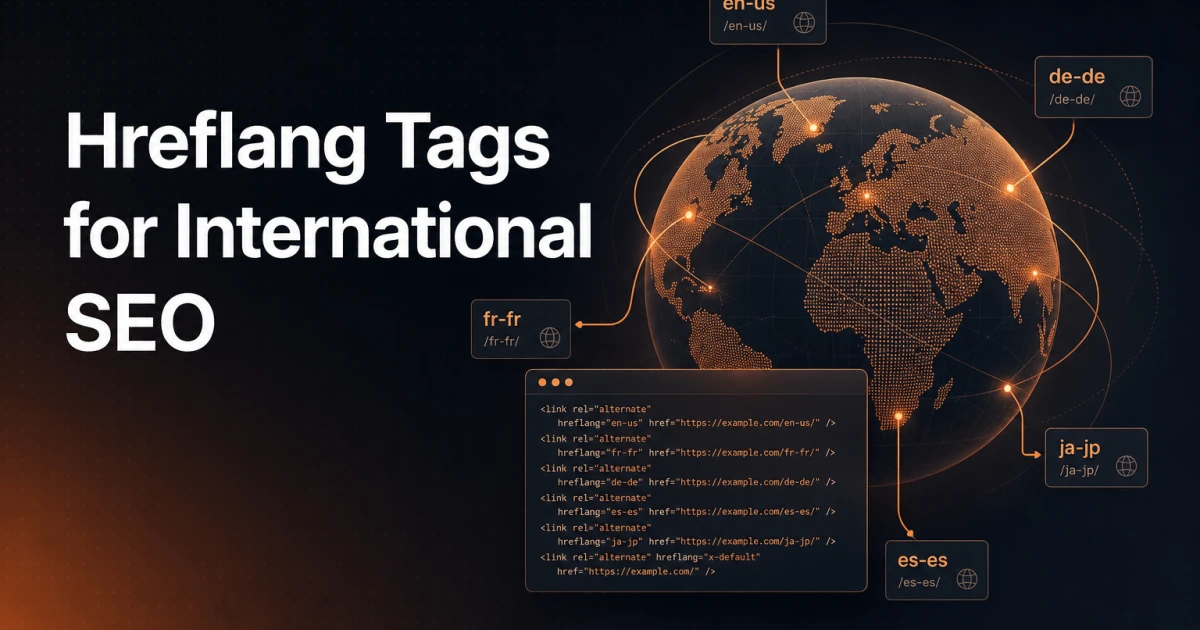
Hreflang tags use a combination of language and region codes (e.g. en-us for English in the USA) to indicate which page is relevant for which audience.
An example of hreflang implementation:
<link rel="alternate" hreflang="da-dk" href="https://example.com/dk/" />
<link rel="alternate" hreflang="en-gb" href="https://example.com/uk/" />
<link rel="alternate" hreflang="x-default" href="https://example.com/" />
x-default functions as a default version shown to users who do not match any of the specified language or region codes.
Common mistakes when implementing hreflang tags
Incorrect language or region codes, such as using en_UK instead of en-gb, can confuse search engines. Missing self-referential tags, where each page does not include a reference to itself, is a common error. Broken links in hreflang tags can lead to crawling issues, and if hreflang annotations are not reciprocal, they lose their effectiveness. Although sitemaps can support hreflang, you should not rely solely on them without also including hreflang in the HTML code.
Tips for handling hreflang on multilingual websites
Use a multilingual plugin such as Signocore Multilanguage that generates hreflang tags automatically, so the annotations stay correct as your content grows. Adapt your content to regional needs by taking local preferences and cultural differences into account. Perform regular audits to ensure your hreflang tags function correctly. Always include an x-default tag as a fallback version for users without a specific match.
Why generate hreflang with Signocore Multilanguage?
Hreflang describes the relationship between language versions, so the tool best placed to output it is the one that manages those versions. For WordPress users, Signocore Multilanguage handles both jobs in one plugin.
Benefits of Signocore Multilanguage for hreflang
Signocore Multilanguage knows exactly which translations belong together, because it manages them, and it outputs correct, reciprocal hreflang tags for every translated page automatically. All three URL strategies (directory, subdomain, and custom domain) produce proper annotations, including x-default, and per-language XML sitemaps help search engines discover each version quickly. With a setup wizard and a familiar WordPress interface, even non-technical users get correct hreflang without touching code.
By managing translations and hreflang in the same plugin you remove the most common failure mode: annotations that drift out of sync with the content they describe.
Final thoughts
Hreflang tags are a crucial part of international SEO, because they help search engines show the most relevant content to users worldwide. To avoid common pitfalls and achieve the best results, correct implementation is a must.
With a multilingual plugin like Signocore Multilanguage it becomes easy and effective to manage hreflang tags on WordPress. Whether you target multiple languages, regions, or both, it is worth investing in good hreflang practices to expand your global reach and improve the user experience.
Are you ready to optimize your WordPress website for a global audience? Explore Signocore Multilanguage's features here.